

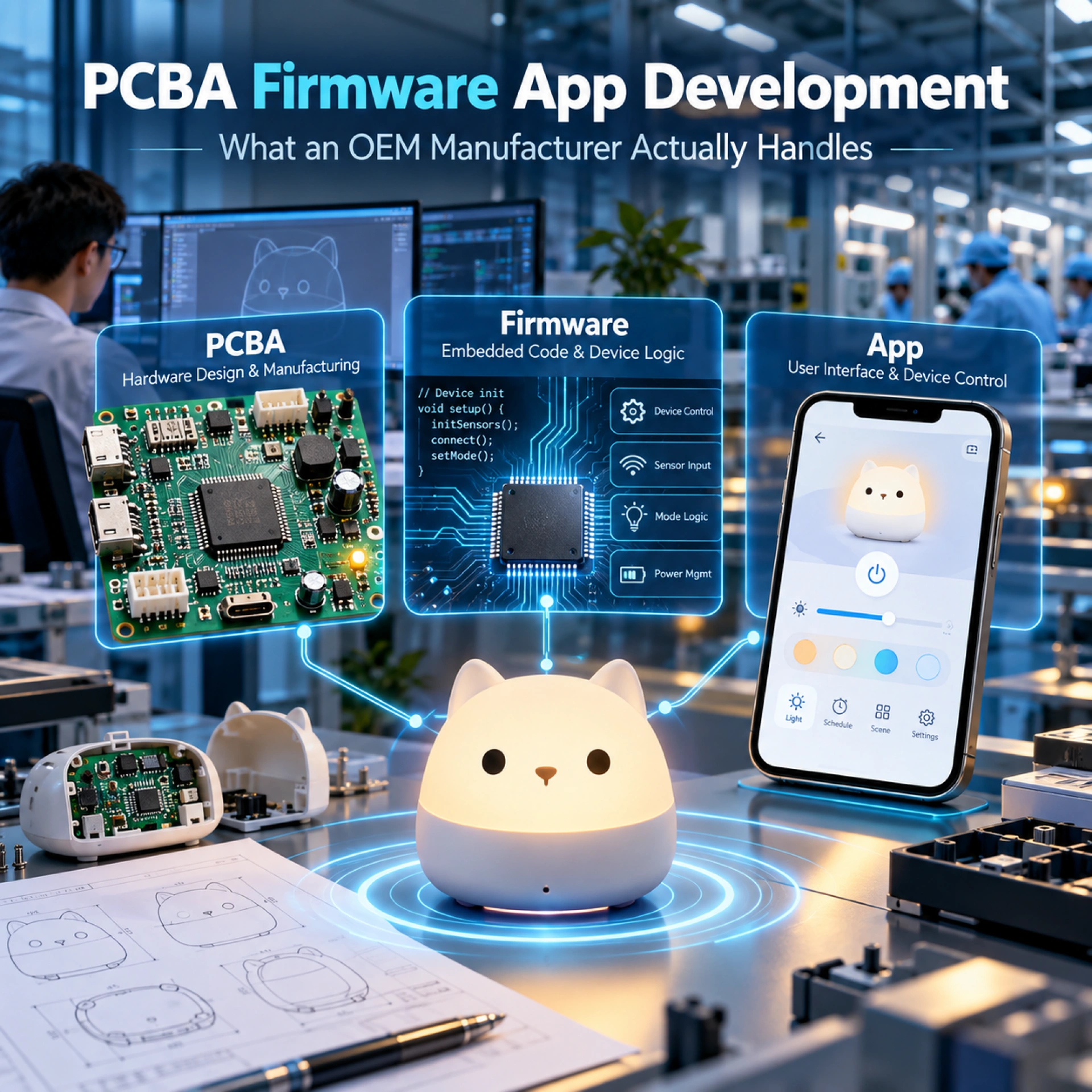
PCBA Firmware App Development is not one single development service. It contains three different technical layers: PCBA creates the hardware platform, firmware controls the hardware and device communication, and the app provides the user-facing software interface, cloud connection, account system, and long-term mobile software experience. An OEM manufacturer may handle the PCBA and embedded firmware directly, while a separate software development team may be required for a full iOS/Android app, backend, cloud platform, APIs, and ongoing app maintenance.
The most important point for buyers is:
App development does not equal PCBA development.
A manufacturer that can design a PCB, select a Bluetooth module, integrate a battery, control LEDs, and write embedded firmware does not automatically have a complete mobile app development team. Likewise, an app developer may know iOS, Android, cloud and UI/UX but may have very little experience with PCB layout, antennas, battery systems, sensors, motors, speakers or mass-production electronics.
For an OEM connected product, the buyer should therefore separate PCBA Firmware App Development into three workstreams:
PCBA → Firmware → App
and define who develops, owns, tests and maintains each layer before production begins.
This distinction is especially important for character electronic products such as Bluetooth speakers, smart alarm clocks, connected night lights, RGB character figures, app-controlled devices, electronic gifts and other smart lifestyle products.
If your brand is still deciding how much electronics should be added to a character product, our guide on Character Figure vs Character Electronic Product explains how electronics change development cost, engineering, testing and product complexity.
PCBA Firmware App Development at a Glance
| Development Layer | Main Responsibilities | Typical Owner |
|---|---|---|
| PCBA | Hardware architecture, MCU, components, BLE/Wi-Fi, battery, LED, sensors, power | OEM factory / electronics engineer |
| Firmware | Device logic, hardware control, BLE protocol, communication, device state | Embedded firmware engineer |
| App | iOS/Android, UI/UX, accounts, cloud, APIs, updates, maintenance | App/software development team |
| Backend | Database, API, user data, remote control, device services | Software/cloud team |
| Production | SMT, flashing, assembly, functional testing | OEM factory |
| Long-Term Maintenance | Firmware fixes, app updates, cloud maintenance | Brand + technical suppliers |
This table is the foundation of PCBA Firmware App Development planning.
1. PCBA Development: Building the Hardware Platform
PCBA stands for Printed Circuit Board Assembly.
In an OEM electronic product, PCBA development creates the physical electronic platform that allows the product to work.
A PCBA project may include:
- MCU
- Bluetooth module
- Wi-Fi module
- Battery charging circuit
- Power management
- LEDs
- Sensors
- Motors
- Speaker circuits
- Microphones
- Buttons
- Displays
- USB-C
- Protection circuits
- Connectors
The PCBA does not define the complete customer software experience.
It provides the electronic hardware on which firmware runs.
Hardware Architecture
The first stage of PCBA Firmware App Development should therefore begin with a hardware architecture.
For example, a character Bluetooth speaker may use:
Battery
↓
Power Management
↓
MCU / Bluetooth SoC
↓
Speaker + LED + Buttons
A smart alarm clock might require:
Power Supply
↓
MCU
↓
Display + Speaker + LED
↓
Bluetooth / Wi-Fi
↓
Sensors + Buttons
The engineering team should define this architecture before selecting final components.
Important questions include:
- Which MCU is required?
- How much processing power is needed?
- How much memory is required?
- Does the product need Bluetooth?
- Does it need Wi-Fi?
- Does it need OTA updates?
- How much battery capacity is required?
- How many LEDs are controlled?
- Which sensors are required?
- Is audio processing required?
- Does the product communicate with an app?
These questions affect both PCBA cost and firmware complexity.
2. Component Selection
Component selection is a major part of PCBA development.
The electronics engineer may need to select:
- MCU
- Bluetooth chipset
- Wi-Fi module
- Battery protection IC
- Charging IC
- Audio amplifier
- LED driver
- Sensor
- Voltage regulator
- Flash memory
- Connector
- Speaker
- Microphone
Component decisions should consider more than price.
Buyers should also think about:
- Supply stability
- Lead time
- Lifecycle
- Firmware support
- Certifications
- Technical documentation
- Replacement options
A cheap wireless module may create future problems if the chipset supplier stops providing SDK updates.
This is why PCBA Firmware App Development should consider both hardware availability and software support.
3. BLE and Wi-Fi Are Part of Hardware and Firmware
Bluetooth Low Energy and Wi-Fi sit between the PCBA and firmware layers.
The hardware engineer selects and integrates the module or chipset.
The firmware engineer makes it communicate.
For BLE products, the project may need:
- BLE module
- Antenna
- Communication protocol
- Pairing logic
- Device ID
- Service definitions
- Characteristics
- Firmware commands
A mobile app cannot communicate with the product unless the device firmware and app use the same protocol.
For Bluetooth products, buyers should also understand the official Bluetooth Qualification Process. Bluetooth SIG states that Bluetooth products must complete the applicable qualification process before being marketed.
This means a Bluetooth product manufacturer should be able to identify:
- Bluetooth module
- Chipset supplier
- Bluetooth version
- Qualified design
- Device profile
- Product model
- Qualification responsibility
Our Custom Bluetooth Speaker Manufacturer guide explains how Bluetooth modules, antennas, batteries, speaker drivers, PCBA and product structure need to work together.
4. Battery and Power Management
Battery planning is another PCBA responsibility.
Rechargeable OEM products may require:
- Lithium battery
- Charging IC
- Battery protection
- USB-C
- Voltage regulation
- Low-battery detection
- Charging indicator
- Sleep mode
The PCBA engineer needs to calculate:
- Working voltage
- Peak current
- Standby consumption
- LED consumption
- Wireless consumption
- Speaker consumption
- Charging current
Firmware also affects battery life.
For example, the firmware may control:
- Sleep mode
- LED brightness
- Bluetooth advertising frequency
- Wi-Fi connection intervals
- Sensor polling
Therefore, battery performance is a good example of how PCBA and firmware work together.
The app, however, does not design the battery circuit.
It may display:
Battery 73%
but that value originates from the hardware and firmware.
5. LED and Lighting Control
Character electronic products often include:
- RGB LEDs
- RGBW LEDs
- Warm white LEDs
- Status LEDs
- Ambient lighting
- Animated light effects
The PCBA provides the electrical circuits.
Firmware determines how the LEDs behave.
The app may allow the customer to select an effect.
For example:
App command:
“Purple breathing light”
↓
BLE protocol:LIGHT_MODE = 03
↓
Firmware:
Interprets command
↓
LED driver:
Controls output
↓
PCBA:
Supplies electrical signals
This is a simple example of how PCBA Firmware App Development works across all three layers.
6. Sensors
A connected product may include:
- Touch sensor
- Motion sensor
- Light sensor
- Temperature sensor
- Humidity sensor
- Accelerometer
- Proximity sensor
- Infrared sensor
Again, the PCBA provides the sensor hardware.
Firmware reads the sensor and decides what happens.
The app may display or configure the result.
For example:
Motion sensor detects movement
→ Firmware activates light
→ App records status
These are three separate engineering functions.
7. Firmware Development: Making the Hardware Behave
Firmware is the software running directly on the device.
This is the second major layer in PCBA Firmware App Development.
Firmware tells the hardware what to do.
Typical firmware responsibilities include:
- Device startup
- Button logic
- LED control
- Motor control
- Audio control
- Sensor reading
- Battery monitoring
- Bluetooth communication
- Wi-Fi communication
- Device state
- Error handling
- Power management
- OTA update support
Without firmware, the PCBA is simply electronic hardware.
Device Logic
Device logic defines product behavior.
For example, a smart character lamp may use:
Short press → Power ON
Double tap → Change brightness
Long press → Pair Bluetooth
Low battery → Red LED
App command → Change RGB mode
Those rules are firmware.
The mobile app may send commands, but the device firmware decides how the physical product responds.
8. Hardware Control
Firmware directly communicates with physical components.
It may control:
- GPIO
- PWM
- I2C
- SPI
- UART
- ADC
- DAC
Buyers do not need to understand every protocol, but they should understand the responsibility boundary.
If an LED does not respond correctly, the problem could be:
- PCBA circuit
- LED driver
- Firmware
- Communication command
It is not automatically an app problem.
This distinction helps buyers communicate problems more efficiently during product development.
9. BLE Protocol
For app-controlled BLE products, firmware and app development meet at the BLE protocol.
The protocol defines what messages are exchanged.
Example:
| Command | Meaning |
|---|---|
| 0x01 | Power ON |
| 0x02 | Power OFF |
| 0x03 | Set brightness |
| 0x04 | Change RGB color |
| 0x05 | Read battery |
| 0x06 | Set timer |
The firmware engineer implements the device side.
The app developer implements the mobile side.
Both teams must use the same protocol specification.
A strong PCBA Firmware App Development project should therefore create a written communication protocol rather than relying on informal engineer-to-engineer discussions.
10. Communication Between Firmware and App
Communication may use:
- BLE
- Wi-Fi
- USB
- NFC
- Cloud API
The complexity depends heavily on the architecture.
Simple BLE Product
Device ↔ Smartphone
The app communicates directly with the device.
This can be relatively straightforward.
Wi-Fi Cloud Product
Device ↔ Router ↔ Cloud ↔ App
Now the project may need:
- User login
- Device binding
- Cloud server
- API
- Security tokens
- Remote commands
- Database
- Device status synchronization
The second architecture is significantly more complex.
This is why buyers should define connectivity before asking for a PCBA Firmware App Development quotation.
11. App Development: A Separate Software Project
This is the point many buyers misunderstand.
App development is not the same as PCBA development.
A full mobile app may require specialists in:
- iOS
- Android
- UI/UX
- Backend
- Database
- Cloud
- API
- Security
- DevOps
- App-store publishing
A factory with excellent SMT and PCBA capability may not have these software specialists internally.
That is normal.
For complex OEM Connected Product projects, the app may be developed by a specialized software partner while the OEM manufacturer focuses on hardware and embedded firmware.
12. iOS and Android Development
A full app may need separate development or cross-platform development for:
- iOS
- Android
App engineers need to consider:
- Bluetooth permissions
- Wi-Fi permissions
- Background operation
- Notifications
- Device compatibility
- Screen sizes
- OS updates
- App-store requirements
Apps also require ongoing maintenance after launch.
Apple’s official app maintenance guidance explains that after publishing an app, developers continue releasing new versions, responding to feedback, reviewing analytics and maintaining the product throughout its lifecycle.
This is an important distinction:
PCBA development usually ends when the hardware platform becomes stable. App maintenance continues as mobile operating systems evolve.
13. UI/UX Design
The app also requires user-interface design.
Typical screens may include:
- Login
- Device pairing
- Home screen
- Device control
- RGB control
- Timer
- Battery status
- Settings
- Firmware update
- Help
- Account management
This is UI/UX development.
The PCB engineer does not normally design these screens.
The embedded firmware engineer does not necessarily design them either.
PCBA Firmware App Development therefore needs coordination between engineering disciplines.
14. Account System
Some connected products do not need an account.
A simple Bluetooth product may work directly with the phone.
But products with cloud functions may require:
- Email registration
- Phone registration
- Password
- User ID
- Device binding
- Password reset
- Authentication
- Authorization
This immediately creates new responsibilities.
Who stores the user information?
Who operates the database?
Who manages password security?
Who handles account deletion?
These questions belong to the app/backend layer, not the PCBA layer.
15. Cloud
Cloud services may support:
- Remote control
- Device status
- User profiles
- Content
- Analytics
- OTA updates
- Push notifications
- Device management
The buyer should know:
- Which cloud provider is used?
- Who owns the account?
- Who pays hosting fees?
- Who maintains the server?
- Who monitors uptime?
- Who backs up data?
- Who can migrate the system?
A product can continue physically working for years while its cloud service becomes unavailable.
That is why cloud ownership should be planned during PCBA Firmware App Development rather than after launch.
16. API Development
APIs connect systems.
For example:
App → API → Cloud Database
or:
Device → Cloud API → App
The API may handle:
- Login
- Device registration
- User settings
- Remote commands
- Data synchronization
- Firmware versions
API development normally belongs to the backend/software team.
The OEM hardware factory may help define device data requirements, but it does not automatically mean the factory develops or owns the backend API.
17. App Maintenance
App maintenance is another reason buyers should separate App from PCBA development.
After launch, apps may require updates because:
- iOS changes
- Android changes
- Bluetooth permissions change
- API changes
- Security vulnerabilities appear
- UI needs improvement
- New phone models appear
- Cloud services change
Mobile security also requires its own development practices.
The OWASP Mobile Application Security Verification Standard provides a recognized framework covering areas such as storage, cryptography, authentication, network communication, platform interaction and secure code practices.
This is software engineering work.
It is not a PCB assembly process.
App Development Does Not Equal PCBA Development
This distinction deserves to be explicit.
| PCBA Development | App Development |
|---|---|
| PCB schematic | iOS application |
| PCB layout | Android application |
| MCU | UI/UX |
| Bluetooth module | App pairing interface |
| Wi-Fi module | User account |
| Battery circuit | Cloud |
| LED driver | Database |
| Sensors | API |
| Components | Notifications |
| SMT | App-store publishing |
| Hardware testing | Software maintenance |
Between them sits firmware:
| Firmware Layer |
|---|
| Device logic |
| Hardware control |
| BLE protocol |
| Wi-Fi communication |
| Sensor logic |
| LED logic |
| Power management |
| Device/app communication |
| OTA logic |
This three-layer model is the easiest way to understand PCBA Firmware App Development.
Who Should Own Each Part?
Before development starts, buyers should define ownership.
| Item | Typical Responsible Party |
|---|---|
| PCB design | OEM / PCBA engineering team |
| PCBA BOM | Electronics engineering team |
| PCB production files | Define in contract |
| Firmware | OEM / firmware developer |
| Firmware source code | Define in contract |
| BLE protocol | Firmware team + app team |
| App UI/UX | Software developer |
| iOS source code | App developer / brand |
| Android source code | App developer / brand |
| App-store accounts | Preferably brand-controlled |
| Cloud account | Preferably brand-controlled |
| API | Software/backend team |
| Security maintenance | Brand + technical suppliers |
| Production flashing | OEM factory |
| Functional QC | OEM factory |
There is no universal ownership model.
The important requirement is that ownership should be written down.
A Practical Example: Character RGB Figure
Consider a character figure with:
- RGB eyes
- RGB weapon
- RGB chest
- BLE
- Mobile app
- Rechargeable battery
PCBA Firmware App Development would be divided as follows.
PCBA
The electronics team develops:
- MCU
- BLE module
- LED drivers
- Battery charging
- RGB outputs
- USB-C
- Protection circuits
Firmware
The firmware team develops:
- LED control
- Brightness
- Color modes
- BLE pairing
- App commands
- Battery status
- Animation patterns
App
The software team develops:
- iOS app
- Android app
- Pairing screen
- RGB color wheel
- Brightness control
- Animation selection
- Firmware update screen
If the app requires only direct BLE control, cloud infrastructure may not be necessary.
This reduces complexity.
Example: Smart Character Alarm Clock
Now consider:
- Wi-Fi
- Bluetooth
- Alarm schedules
- Cloud account
- Mobile app
- OTA firmware updates
- Remote settings
The architecture becomes:
PCBA
↓
Firmware
↓
Wi-Fi/BLE
↓
Cloud API
↓
Mobile App
This may require:
Hardware Team
- MCU
- Wi-Fi
- BLE
- display
- speaker
- battery
- LEDs
Firmware Team
- alarm logic
- audio
- display
- Wi-Fi communication
- BLE
- OTA
- device state
App Team
- user interface
- login
- alarm settings
- device binding
- cloud communication
Backend Team
- API
- database
- authentication
- device management
- OTA infrastructure
Clearly, this is much more than PCBA development.
PCBA Firmware App Development Cost Should Be Quoted Separately
Buyers should avoid asking:
“How much for electronics and app?”
That scope is too broad.
A better quotation structure is:
PCBA Engineering
Includes:
- Hardware architecture
- Schematic
- PCB layout
- BOM
- Prototype
- Debugging
Firmware Engineering
Includes:
- Device logic
- Hardware drivers
- BLE/Wi-Fi
- Communication
- Testing
App Development
Includes:
- UI/UX
- iOS
- Android
- Device pairing
- API integration
Backend / Cloud
Includes:
- Server
- Database
- API
- Authentication
- Device management
Maintenance
Includes:
- Firmware updates
- App updates
- Cloud maintenance
- Security fixes
This makes PCBA Firmware App Development quotations much easier to compare.
What Buyers Should Prepare Before Requesting a Quote
Before asking an OEM manufacturer for PCBA Firmware App Development, prepare:
Product Functions
List every function.
Example:
- Bluetooth
- Wi-Fi
- RGB
- speaker
- sensor
- display
- timer
User Interaction
Explain:
- buttons
- touch
- app
- voice
- remote control
Connectivity
Confirm:
- BLE
- Bluetooth Classic
- Wi-Fi
- cloud
- USB
App Requirements
Define:
- iOS
- Android
- login
- cloud
- device control
- notifications
Ownership
State whether:
- brand requires firmware source code
- brand requires app source code
- brand controls cloud accounts
- brand controls app-store accounts
Target Market
Confirm the countries where the product will be sold.
This may affect wireless, electrical, cybersecurity and product compliance planning.
When Should PCBA Firmware App Development Start?
A practical development sequence is:
| Stage | Main Work |
|---|---|
| 1. Function Definition | Define product functions |
| 2. System Architecture | Separate hardware, firmware and app |
| 3. PCBA Prototype | Build electronic platform |
| 4. Firmware Alpha | Make hardware work |
| 5. Communication Protocol | Define device/app commands |
| 6. App Prototype | Test core interaction |
| 7. Integrated Prototype | Hardware + firmware + app |
| 8. Tooling | Freeze physical structure |
| 9. Engineering Validation | Test complete system |
| 10. Pre-Production | Lock firmware and hardware version |
| 11. Mass Production | SMT, flashing, assembly, QC |
| 12. Post-Launch | App/firmware maintenance |
The app should not be the first thing built.
The hardware and communication architecture should be clear first.
What Should an OEM Manufacturer Actually Handle?
A capable electronics OEM manufacturer may handle:
- Product engineering
- Structural engineering
- PCBA architecture
- PCB development
- Component selection
- SMT
- BLE/Wi-Fi integration
- Battery integration
- Embedded firmware
- Prototype testing
- Production flashing
- Assembly
- Functional QC
- Aging testing
- Packaging
However, full app development may require a specialized software team.
This should not be hidden from the buyer.
A professional OEM manufacturer should explain:
“We handle the hardware and embedded firmware. The mobile app is developed with a software partner.”
That is much more useful than claiming everything is internally developed when it is not.
Our article on Who Is Responsible for Firmware, App and Cybersecurity in an OEM Connected Product explains how buyers should divide ownership and post-launch responsibilities across the factory, firmware developer, app team and brand.
Cybersecurity Should Also Be Separated by Layer
Security is different across the three layers.
PCBA / Hardware
May involve:
- debug interfaces
- secure elements
- hardware protection
- physical access
Firmware
May involve:
- secure boot
- firmware signing
- authentication
- OTA updates
- communication security
App
May involve:
- secure storage
- login
- encryption
- API security
- permissions
- user data
This is why cybersecurity responsibility cannot simply be assigned to “the PCBA supplier.”
For EU-connected products, buyers should also review our Cyber Resilience Act for Character Electronic Products buyer checklist before freezing the product architecture.
How Jiahong Creative Handles PCBA Firmware App Development
Jiahong Creative supports OEM character electronic products through product development, structural engineering, tooling, injection molding, PCBA assembly, embedded electronic functions, firmware coordination, assembly, functional testing, packaging and mass production.
For PCBA Firmware App Development, our practical scope can include:
PCBA
- Hardware architecture
- Component integration
- Bluetooth / BLE
- Wi-Fi modules
- Battery systems
- LED control hardware
- Sensors
- Speaker systems
- PCBA assembly
- SMT
Firmware
- Device functions
- Hardware control
- LED logic
- Sensor logic
- BLE communication
- Device protocols
- Embedded software coordination
App
For projects requiring a complete mobile app, backend or cloud platform, we can coordinate with external software development partners.
This may include:
- iOS
- Android
- UI/UX
- Device pairing
- Account systems
- Cloud
- API
The scope should be defined clearly at the beginning.
We do not treat App development as automatically included in PCBA development.
This makes it easier for buyers to understand:
What Jiahong develops → What the software partner develops → What the brand owns
For character-based electronics such as Bluetooth speakers, night lights, alarm clocks, connected figures and other smart lifestyle products, this responsibility structure can reduce confusion during development.
Our Character Electronic Gift Manufacturer guide explains how PCBA, molding, painting, assembly and packaging fit into the broader character-electronics manufacturing process.
Final Thoughts
PCBA Firmware App Development should never be treated as one undefined engineering package.
It contains three technical layers:
PCBA = Hardware
Firmware = Device Intelligence
App = User Software
The PCBA determines what electronic components exist.
Firmware determines how those components behave.
The app determines how the customer interacts with the connected product.
A Bluetooth chip on a PCB does not create an app.
Firmware that supports BLE communication does not automatically create an iOS interface.
An iOS/Android app does not replace embedded firmware.
And a complete connected product may require all three teams to cooperate.
The most important buyer rule is therefore:
Separate PCBA, firmware and app scope before requesting a quotation.
Define hardware architecture, firmware responsibilities, communication protocols, app features, backend requirements, ownership and maintenance before tooling and mass production.
When PCBA Firmware App Development is divided clearly, OEM development becomes easier to quote, easier to manage and much easier to maintain after launch.
FAQ
1. What is PCBA Firmware App Development?
PCBA Firmware App Development is the combined development of a connected electronic product across hardware, embedded software and mobile software. PCBA creates the electronics, firmware controls the device, and the app provides the mobile user interface and connected services.
2. Is app development part of PCBA development?
No. App development is not the same as PCBA development. PCBA development covers hardware architecture, PCB layout, electronic components and circuits. App development covers iOS, Android, UI/UX, account systems, cloud services, APIs and long-term software maintenance.
3. What does PCBA development include?
PCBA development may include hardware architecture, MCU selection, BLE/Wi-Fi modules, batteries, power management, LEDs, sensors, speakers, charging circuits, schematic design, PCB layout, prototype assembly and debugging.
4. What does firmware development include?
Firmware development normally includes device logic, hardware control, sensor reading, LED control, power management, BLE/Wi-Fi communication, communication protocols, error handling and firmware update logic.
5. What does app development include?
App development may include iOS and Android applications, UI/UX, device pairing, controls, user accounts, cloud communication, APIs, notifications, analytics and ongoing maintenance.
6. Can an OEM factory develop both PCBA and firmware?
Yes. Many electronics OEM manufacturers can support PCBA engineering and embedded firmware. The exact capability depends on the factory and engineering team.